
A selection of scripts from my graphic novels and comics, which you may find useful. Dates refer to when the script was written; publication year may differ.
— Antony
(ARTISTS: click here for a sample script you can work from.)

Act I of the script for the Shakespearean graphic novel Julius. This script shows my original format (Julius was written in Final Draft, before I switched to Scrivener), and is a good example of how to direct an artist you've never worked with before.


This script for issue #9 of Wasteland shows a later format, with some tweaks. The style is also looser and more casual – by this time artist Christopher Mitten and I had been working together for almost a year on Queen & Country and Wasteland.

Shadowland: Blood on the Streets #1 (2010)
Shadowland: Blood on the Streets uses the same essential format, even though I switched from FD to Scrivener in 2007. This script was another case of working with a new artist, and one for whom English is a second language, so some of the direction is quite formal and detailed.

The debut issue of Umbral. Another format tweak, though still recognisable. Stylistically, though, this script is very informal – by this time, Christopher Mitten and I had produced more than 700 pages of comics together.
• See also the writer's notes for this issue on tumblr
For Artists
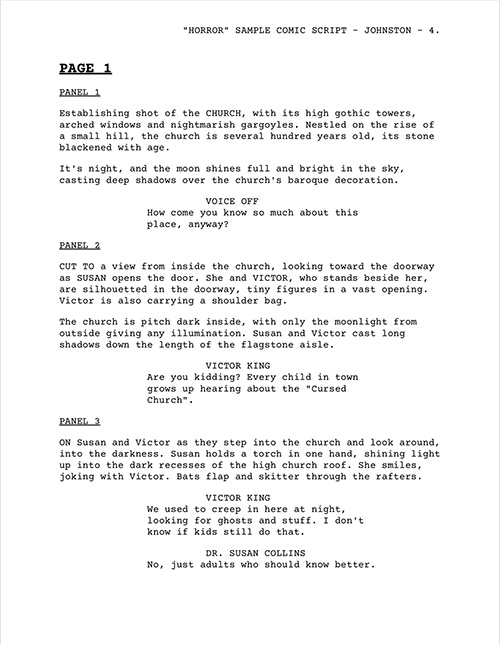
In 2005, Oni Press asked me to write a short horror-focused script for artists entering their Comic-Con talent search (other writers produced sample scripts in other genres). This reformatted version is now freely available for any artist to practice, or draw submission pages, from a script written specifically to showcase sequential art skills.
Comic script templates
Scrivener features a built-in Comic Script template which I designed in conjunction with the developer, based on my screenplay-like format. Click here for articles showing how to use it.
Final Draft now includes some graphic novel templates with the application, but they are rather perfunctory and old-fashioned. I continue to prefer my own:
• Download Antony's Final Draft template
NB This template was originally designed for Final Draft v8 on Mac OS X. It should run on later platforms and versions, but I can't guarantee that, and I don't support it in any way. The template is supplied as-is, with no warranty or indemnity given or implied. If Final Draft breaks or your computer blows up, it's not my fault. By downloading the template, you agree to this disclaimer.
The Fountain plaintext markup language was created by John August and Stu Maschwitz for use in screenwriting. I use the format for screenplays, but it can also be used to script comics, as this template shows.
• Download the Fountain template.
• Download and read the SHADOWLAND: BLOOD ON THE STREETS #1 script, re-formatted in Fountain. It wasn't originally written this way, but it's a good example of what a real comic script looks like in this format.
Software designed to use Fountain:
• Highland, a screenwriting app from John August. As of v2, Highland contains a built-in Graphic Novel format similar to my template.
• Slugline, a screenwriting app from Stu Maschwitz.